
View Campaigns
The section of the platform where you view all of your campaigns as well as Send Summary and Campaign Calendar
View Campaigns
View Campaigns is the section of the platform where all your campaigns are listed, alongside some useful statistics and information about your campaigns. Here you can also apply Labels to your campaign, view the Campaign Calendar and looks at your sends in the Send Summary tab.
All Campaigns
All Campaigns is the main screen of the View Campaigns section in the platform. Here you can see a list of all your campaigns, with the below information against each. These columns can be filtered using the input boxes/arrows at the top of each column.
You can also click on a campaign row and click the "view" button on the right-hand side for more information.
- Campaign Name - a unique name for the campaign, can only contain alphanumerics and hyphens/underscores.
- Type - the type of campaign SeeTypes of Campaign
- Labels - the number of Labels on this campaign SeeLabel Manager
- Updated By - who last updated the campaign
- Last Update - when it was last updated
- Live Schedules - the total number of schedules in the "Live" state in the campaign
- Note this does not include "Complete" run-once schedules
- Sent - total number of emails sent from this campaign
- Unique Open Rate
- Unique Click Rate
- Unsubscribes
From here you can then create a new campaign or load an existing campaign
Viewing more details
By clicking the "view" button on the far-right of a selected Campaign's row, you can view more audit information about the campaign, the screenshot below shows what data you're able to see:
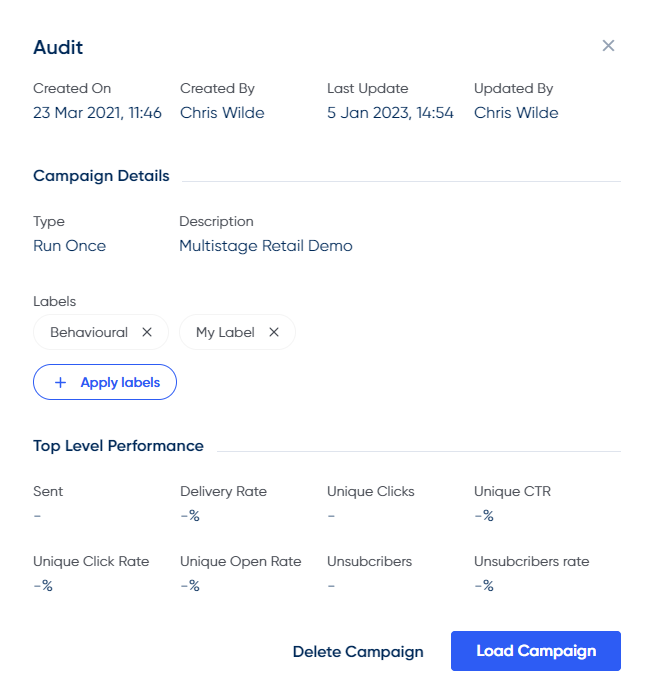
The campaign audit view
Campaign Calendar
Here you can see a layout of your run-once schedules in a Campaign format, where you can click through to each schedule/campaign to view the contents.
SeeCampaign Calendar for more information
Send Summary
This tab gives you a summary overview of the schedules that have been sent from the platform in the last 2 days and the volumes/subject lines against them.
SeeSend Summary for more information
Updated over 1 year ago