
Rules
Rules allow you to overlay additional exclusions/logic to your sends at a schedule level
Rules
The "Rule" toolbar item
The toolbar item "Rule" allows you to branch out your campaign journey based on a single or set of rules you apply. Some examples are:
- Not opened the previous schedule
- Not bought in the last 7 days
- Not clicked the previous schedule
- Not filled out the preference centre
The Rule item also allows you to select a "True" and "False" result of these rules in the form of Green and Red lines to drag off. These will reverse the logic of the rule you've added when selecting "False", allowing you to do something different with those who have opened instead of haven't opened.
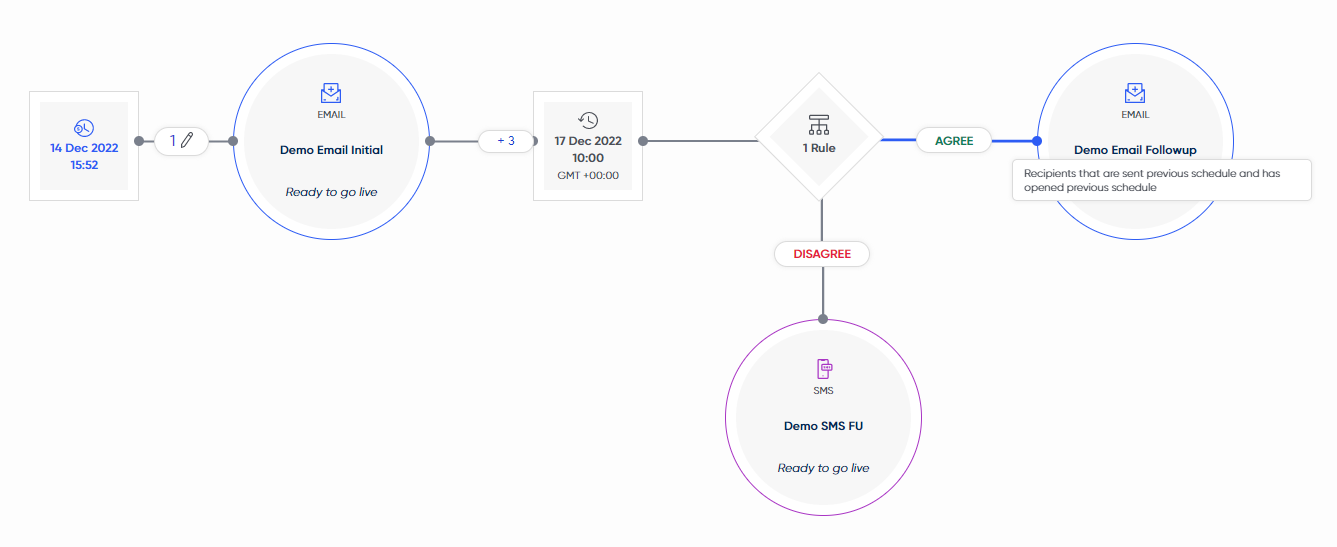
Click to expand - an example of a Rule item being used to branch a campaign flow based on opening the previous schedule or not
Use rule items to create your omni-channel journeys!Rules allow you to see whether your customers are interacting with certain content or channels.
As you can see in the above example, if someone isn't interacting with email content then we will move them over to the SMS channel to see if they convert better.
Delivery Rules
Default Delivery Rules
When adding a schedule onto the campaign, they will be created with 2 default rules in place under the recipients tab:
- Not sent any schedule today
- This rule means your customers will only receive a single schedule in the day, ensuring that you're not over-emailing your customer base.
- Not sent this schedule before
- This rule checks whether the customer has received the specific schedule it's attached to before.
Recurring Schedules and the "Not sent this schedule before" rule:This is especially important for Recurring schedules!
Do you want them to receive this more than once in their lifetime, or should you replace this with a custom delivery rule looking at the last 7 days, for example?
A welcome email would likely only ever want to be sent once, however if a customer is abandoning on-site multiple times a week/month, they should receive the email more often.
Delivery Rule Types
There are 4 categories of delivery rules:
- Previous Schedule - rules looking at engagement/interaction with the previous schedule
- Such as "Not opened previous schedule"
- This Campaign - rules looking at engagement/interaction with this entire campaign
- Such as "Not click any schedule in this campaign"
- Restrictions - rules added to the schedule by default, and also permit related rules
- Such as "Not sent any schedule today"
- User Defined Rules - rules created by users on the platform
These delivery rules can also be applied to schedules directly, to exclude people who have or haven't taken certain actions. Such as excluding anyone who is in a certain country or excluding anyone who's been sent this schedule in the last 7 days.
Benefits of using Delivery Rules
- Delivery rules do not require segment recalculations
- Delivery rules are overlaid on top of all segments attached to a schedule, so you don't need to edit all your segments
- As they sit outside of the segments, it allows you to have more "master" segments that are broken down by delivery rules on send.
Updated over 1 year ago