
Campaign Calendar
Shows you a monthly calendar view of schedules sent, which you can then load to view
Campaign Calendar
The campaign calendar shows you a monthly view of the schedules that have been sent from the platform, which you can then click on to load their campaign. The video below explains the view in more detail:
A great tool for checking and send conflicts too!Sometimes you may see a drop in an emails send count, which is most likely due to people already having received a schedule from you that day.
The Campaign Calendar is a great tool to quickly see if something else has gone that day, allowing you to investigate with ease.
Filtering the view
The view can be filtered using the "Filter By" button at the top-right of the window. This will allow you to enable the visibility of other schedule types, such as Draft schedules, which can allow you to look ahead into your future planned Campaigns.
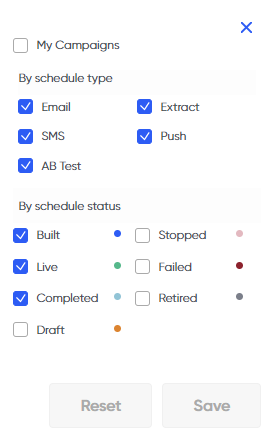
Available filters in Campaign Calendar
Updated over 1 year ago